Celenium
Celestials bring the same clarity to blockchain explorers as DNS brings to the web. Instead of raw addresses, Celenium can show people‑friendly names. Type a name like alice.i in the search bar to jump to the right account, and on account pages see the primary Celestial ID associated with the address.
- Interactive docs: https://api.celestials.id/scalar
- API Overview: https://celestials.id/docs/api-overview
About Celenium
Celenium is a Celestia blockchain explorer. It provides real‑time views of blocks, transactions, addresses, namespaces, validators, rollups and more.
What users can do in Celenium today
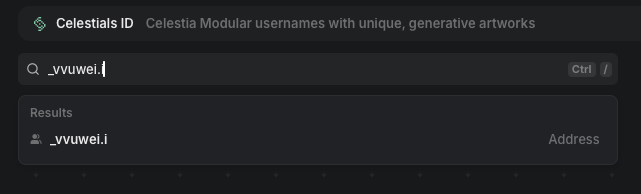
- Search by name: Type a Celestial ID (e.g.,
alice.i) into the Celenium search bar and navigate directly to the matching account.
- See your name on account pages: On an address page, Celenium shows a "Celestials” section with the address's primary Celestial ID when one exists.
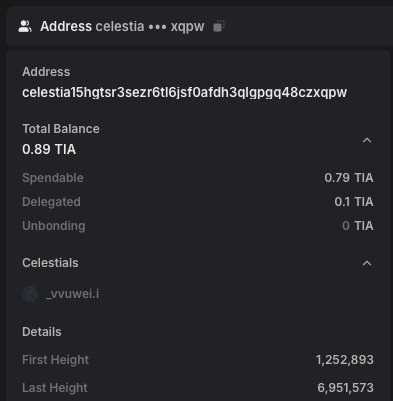
- Live example: Address with Celestial ID
Try it now
Get started:
- Go to https://celestials.id
- Search for a name and start an auction
- Link your Celestia address to your
.iname. - Go to https://celenium.io and search for your name (e.g.,
yourname.i) and visit your account page to see it in the Celestials section
How it works in Celenium
Celenium integrates with Celestials using the address_changes feed. It maintains a server-side index built from this feed; no live lookups are performed at query time.
- For search by name (
*.i): Validate the input, then consult the server-side index (built from the address changes feed) to get the Celestia address and navigate to that account page if present. - For account pages: When rendering an address, consult the server-side index for the address's Celestial ID on the Celestia chain and display it in the "Celestials" section when available.
- Keep it fast and fresh: Use the address changes feed to maintain a server-side index (optionally with avatars via
with_images: true), serve results from this index, and process updates in order (store mappings, handle removals whenaddressis null, persist the lasthead, and poll every few seconds).
Indexing example:
curl https://api.celestials.id/api/resolver/changes \
  -X POST \
  -H 'Content-Type: application/json' \
  -d '{
    "chain_id": "celestia",
    "from_change_id": 0,
    "limit": 1000,
    "with_images": true
  }'
Endpoints used by Celenium
- POST /api/resolver/changes - index address changes
See Explorer Integration for a deeper, explorer‑focused guide.
FAQ
-
How do I get my own
.iname? Visit https://celestials.id, search for a name, start an auction, and link your addresses. -
Why don't I see a name on an address page? The address may not have a linked Celestial ID for the Celestia chain.
-
I searched for a name but didn't get an account result - why? The name may not exist, or it may not have an address set for the Celestia chain.
-
Is this secure? Yes. Name‑to‑address links are established with cryptographic signatures.
-
I just linked my Celestial but don't see it in Celenium - why? Indexing on Celenium may not be instant. Wait a few minutes for the changes feed to be processed, then refresh the page.
Support
For technical questions or integration assistance: support@celestials.id